
Frequent user interface (UI) changes in modern applications often break automated test scripts, leading to delays, increased maintenance effort, and higher costs. Traditional approaches require manual updates and reruns, which can take hours for even minor changes and significantly slow down release cycles. This white paper introduces self-healing test scripts, a solution that combines heuristic logic and identification driven by artificial intelligence (AI) to automatically adapt to UI changes. The approach uses a layered strategy: first attempting the original locator, then applying heuristics, and finally leveraging an AI model when needed. A detailed report of healed elements simplifies maintenance and reduces turnaround time.
By eliminating the need for manual locator updates and reruns, this solution can save several hours per test cycle and reduce the risk of undetected bugs. It improves Continuous Integration/Continuous Deployment (CI/CD) stability, accelerates delivery timelines, and minimizes human intervention, resulting in both time and cost efficiencies. Future enhancements will include support for multiple AI models, improved reporting, and automated script updates. Self-healing powered by Generative AI (GenAI) offers a practical path to resilient, efficient test automation that delivers measurable productivity gains.
Modern software applications are increasingly focused on delivering rich and dynamic UI and seamless user experiences (UX). While this evolution enhances usability, it introduces significant challenges for automated testing. Test automation frameworks rely heavily on stable UI element identifiers to validate functionality. However, frequent changes in application code—especially updates to UI elements—often break previously working test scripts. This results in additional effort to maintain scripts and delays in the testing cycle.
Testing modern UI/UX applications introduces several pain points that impact the reliability and efficiency of automated scripts. These challenges often lead to increased maintenance effort and delayed feedback in the development cycle:
The current approach to handling UI changes in test automation involves several manual steps:
On average, analyzing failures and updating scripts manually takes one to two hours per scenario. In cases where multiple elements are affected, the effort can increase significantly, impacting overall testing timelines and delivery schedules.
In traditional test automation, scripts fail when UI element locators change, leading to time-consuming manual fixes.
Self-healing scripts address this challenge by introducing resilience into the automation process. Instead of halting execution when a locator becomes invalid, the script intelligently searches for alternatives—first through heuristic methods and then, if necessary, using AI-driven techniques. This layered approach ensures tests continue running smoothly, even in dynamic UI environments.
Instead of halting execution when a locator becomes invalid, the script intelligently searches for alternatives.
The implementation follows a structured yet adaptive process.
The journey begins with creating a self-healing function—a reusable component designed to identify elements on a web page. When a test runs, this function first attempts to locate the element using the original locator. If successful, the script proceeds without interruption.
However, when the locator fails, the script doesn’t stop. Instead, it handles the NoSuchElementException gracefully and invokes a heuristic method. This method uses alternate attributes or patterns derived from the original locator to find the element. The alternate locators are ordered according to priority in which the element needs to be identified based on the given locator value, so the most probable locator will be used first to identify the element and only if that fails, it moves to the next most probable locator to identify the element. If the heuristic approach succeeds, the test continues seamlessly.
If both the original locator and heuristic method fail, the solution escalates to the AI-based approach. Leveraging the Mistral model, the script predicts and identifies the correct element based on historical patterns and contextual clues. This AI step is intentionally reserved as a last resort because it is more computationally intensive than heuristic checks.
Finally, the process concludes with report generation. The report captures:
This transparency simplifies future maintenance and provides valuable insights into UI changes.
The benefits of this solution extend beyond reducing failures:
The framework was built using Python and Behave, developed in PyCharm Community Edition. For browser interaction, Selenium with ChromeDriver was employed. The AI capability relies on Mistral (mistral.mistral-large-2407-v1:0), which powers the intelligent element identification process.
Implementing self-healing in a new application starts with designing a reusable function that becomes the backbone of element identification. This function should be modular and structured for flexibility:
The main function should:
This layered approach ensures that the script exhausts all options before failing, making it robust against UI changes.
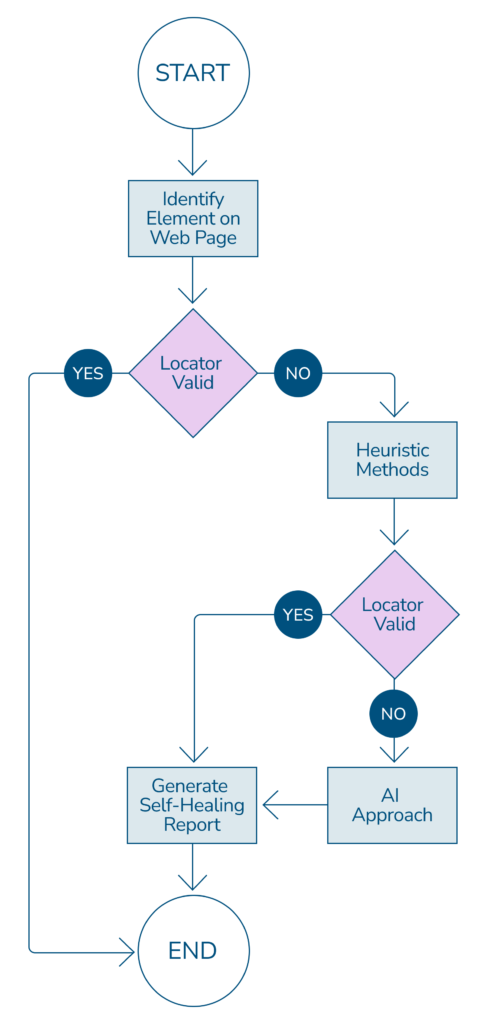
Enhancing existing scripts to become self-healing requires minimal but strategic changes:
The element locator identified by the heuristic or AI model is used to substitute the existing failed identifier used in the script to complete the test scenario run. If the scenario has passed the validation using the identifier provided by the heuristic approach or the AI model, then it has proved to be a successful identifier to be used. Also, a report is created on the new self-healed identifiers used, so the user can verify again before updating the script with the new identifier.
Setting up the framework was one of the biggest hurdles, as it required integrating multiple components and ensuring they worked seamlessly together. Another challenge was choosing the right self-healing strategy from several available options. Each approach had trade-offs, so finding a balance between performance and adaptability was critical.
Self-healing is not a one-size-fits-all solution. There are numerous ways to implement it, and the chosen approach should reflect the project’s requirements and constraints. The method described here is one implementation and can be adapted or extended to suit different environments.
The current implementation lays a strong foundation, but there are several enhancements planned to make the framework more robust and user-friendly:
This depends on the stage of the project, what technology and tools are used for development, and the member of the team responsible for the development. Script maintenance issues can be reduced drastically if the development team works hand in hand with the test automation team, which can ensure minimum failures in the automation scripts. If proper measures are adopted by the development and test team working together, there will only be minimal element locator identifier issues arising from regular project maintenance, and the self-healing approach used here will be able to handle these and thus save considerable time. This self-healing approach helps teams develop independently in parallel while minimizing test failures and thus contributing to significantly faster development and testing iterations.
Script maintenance issues can be reduced drastically if the development team works hand in hand with the test automation team, which can ensure minimum failures in the automation scripts.
There are tools that make use of AI and images for self-healing in the industry, but most of these are paid tools. For open source, there is healenium, but this is a java based library. At the moment, our solution with custom built functions with open-source libraries described here is the only self-healing automation testing solution.
Self-healing test scripts represent a significant advancement in test automation. When implemented correctly, they can dramatically reduce maintenance effort and turnaround time, allowing teams to focus on higher-value tasks. However, success depends on a thorough understanding of the application under test and careful design of heuristic and AI strategies tailored to its complexity.
In practice, this approach not only resolves minor to moderate locator issues but also ensures smoother CI/CD pipelines by preventing failures caused by UI changes. The inclusion of detailed reports further simplifies script maintenance, making the process almost effortless.
The use of Mistral Large as an AI model has shown promising results in identifying elements accurately within the limited scope tested. While early outcomes are encouraging, broader testing in complex environments is essential to validate its effectiveness. As confidence grows, the integration of GenAI into test automation frameworks can evolve from a simple assistive feature to a core capability, driving efficiency and resilience across testing processes.
